Hello, I’m Crafty Olive.
Last time I briefly explained how I came to make the shrimp game. Before that, though, the main reason I got into vibe coding was that I wanted to make an Excel-based building thermal energy analysis program I had built much more accessible. I had put a great deal of time and effort into it, but it was hard to use in practice or share with others.
 My Excel-based building thermal energy analysis program, built on the response factor method
To me, the program felt like something I cared about deeply but had never managed to put to real use. So I began looking for a way to move it to a more accessible platform.
The platform I chose was Roblox. It provides servers and hosting essentially for free, and I expected students to find it relatively easy to get into. It looked like an attractive platform for education and experimentation.
There was a catch, however. Roblox development uses a Lua-based language, which was quite unfamiliar to me. At first I felt the pressure of wondering whether I could learn it while building the program at the same time.
Just then, vibe coding was starting to spread in earnest. I began by working through a simple conceptual design with GPT, then used its help to write code and port it into the actual game. To my surprise, it worked much better than I expected. From then on, I spent my evenings after work gradually moving my old Excel program into Roblox. It was so much fun that I sometimes stayed up all night.
The biggest lesson from this work was that in areas requiring engineering judgment, such as heat balance, AI tends to oversimplify difficult concepts.
For example, what I wanted to implement in the Roblox game was Hittle’s response factor method for calculating heat transfer through walls. At first, the LLM often gave me not code that properly reflected the method, but simplified formulas that produced plausible-looking results.
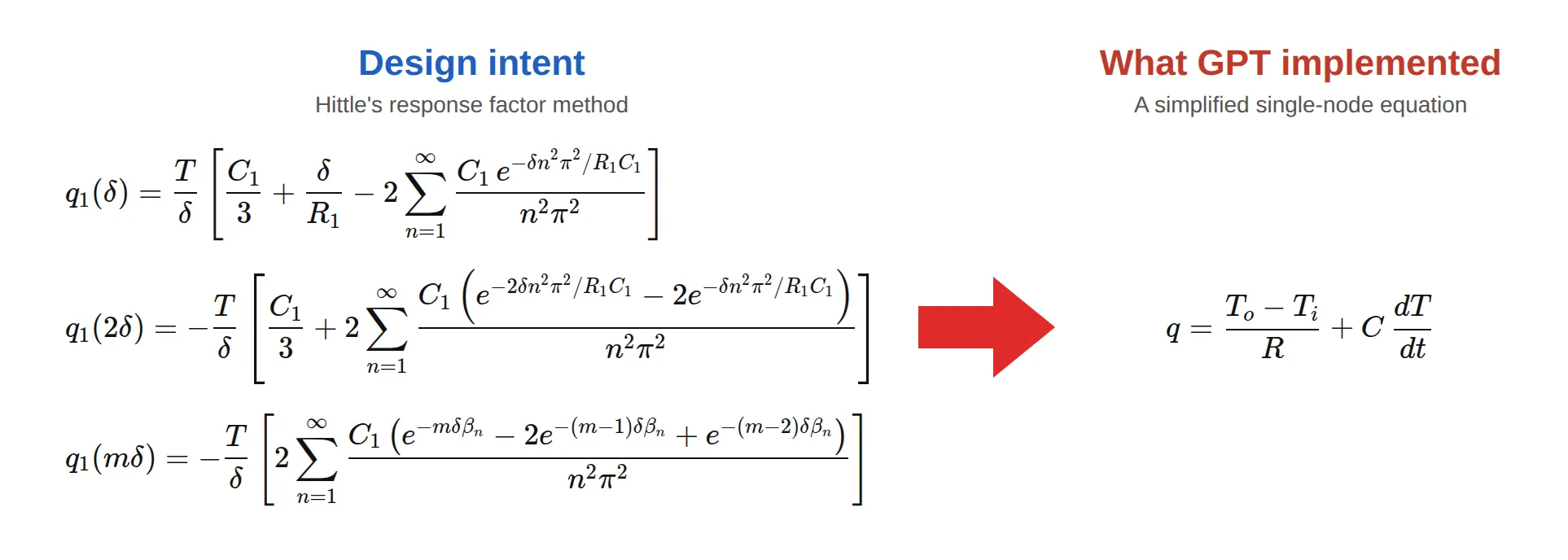 Left: the response factor equations I intended to implement. Right: the equation GPT actually wrote.
The gap is easy to see side by side. The response factor method tracks how heat travels through a wall over time, step by step, while GPT’s version treats the whole wall as a single point with one resistance and one heat capacity. Results like these looked right at a glance but frequently turned out to be wrong on closer engineering review. GPT’s implementations were particularly hard to debug, because they ran reasonably well in the game.
So instead of putting in every algorithm at once, I changed course: I broke the equations into steps and implemented and verified them one at a time. It was debugging hell, but the approach worked well. I learned that while AI is undeniably powerful, in areas where engineering consistency matters, the user has to take the structure apart and verify it.
After many twists and turns, I finished a prototype of the building energy game in about three weeks. I ran tests afterward, but Roblox itself was still unfamiliar to many people, and even those who wanted to take part struggled to get in because of account creation and the need to get used to the environment. After much deliberation I shelved the project, but the experience of pushing a project through with AI remains a valuable asset for me.
I then built on that experience to start the shrimp game. This time I treated accessibility as a priority from the start, planning for web-based development and distribution as an app. At the same time, I thought about a way of working that would make the most of AI.
The approach I settled on was a vibe coding process that combines Cursor, Copilot and GPT.
Cursor is an AI tool specialized for coding. It understands project structure fairly well, and its agent feature can modify several files at once. Using it felt as if my thoughts were reflected in the code almost in real time, and compared with my Roblox days using GPT alone, my productivity felt several times higher. Projects written in Cursor can also be saved to GitHub, and the results can be run directly in a real web environment. (Google’s Antigravity has recently become very capable as well, but for breaking engineering details into small pieces and debugging them, I think Cursor still has the edge.)
Copilot is GitHub’s agent service. Combined with GitHub Mobile, it lets me not only review code but also carry out simple fixes directly from my phone, which has proved quite practical. Its strength is that much of the flow of managing, modifying and reviewing the repository can stay inside GitHub.
GPT, on the other hand, feels less like a tool built specifically for vibe coding and more like one that excels at work requiring logical depth. I usually start by discussing the conceptual design with GPT, then write a prompt specification based on the result. I hand that specification to Cursor or a Copilot agent to carry out the actual implementation.
I also use GPT’s agent feature for QA. I’m still learning how best to use it, but I was quite surprised to see GPT pick up on subtle, emotional aspects of the experience that I had missed.
AI tools are, of course, still evolving rapidly, so my workflow may well change. So far, though, I feel this approach alone can already produce remarkably good results.